


admin
ADMIN
++
Puan
1
Çözümler
0
Description
This guide will run you through on to display a thread cover photo in the thread list. It will use the first image in your thread, whether linked directly or attached. If the thread doesn't have a cover photo, it will use the thread creators avatar.
Guide
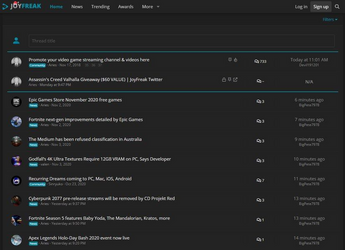
This guide will run you through on to display a thread cover photo in the thread list. It will use the first image in your thread, whether linked directly or attached. If the thread doesn't have a cover photo, it will use the thread creators avatar.
Guide
- Go to Admin CP > Appearance > Templates > Search: thread_list_macros
- Go to Admin CP > Appearance > Templates > Search: extra.less
- Step 1 details
- Find
Kod:
<xf:avatar user="$thread.User" size="s" defaultname="{$thread.username}" />- Replace
Kod:
<xf:if is="$thread.cover_image">
<a href="{{ link('threads' . (($thread.isUnread() AND !$forceRead) ? '/unread' : ''), $thread) }}" class="structItem-cell structItem-cell--icon search_articles_thread" style="background-image: url('{$thread.cover_image}')"> </a>
<xf:else />
<xf:avatar user="$thread.User" size="s" defaultname="{$thread.username}" />
</xf:if>- Step 2 details
- Paste at the top in extra.less
Kod:
.search_articles_thread {
    border-radius: 50%;
    width: 36px !important;
    height: 36px;
    display: inline-block;
    background-position: center;
    background-size: cover;
    overflow:hidden;
}- Screenshot